Effects & Systems
Implementing Collision Detection
Collision detection answers two questions: are these shapes touching? and what should happen when they touch? This tutorial teaches practical 2D collision checks in MonoGame: rectangles for walls and sprites, points for clicks, circles for round objects, and simple response code that keeps a player from walking through solid blocks.
Download the runnable sample project
Use the verified ZIP bundle for this article to review the extracted example files, run the sample host, and repackage the sources without bin or obj folders.
AABB rectangle collision
An AABB is an axis-aligned bounding box: a rectangle that is not rotated. It is the most common first collision shape because MonoGame already provides Rectangle and the built-in Rectangle.Intersects(Rectangle) method.
Use AABBs for tile blocks, platforms, menu buttons, pickups, and sprite bounds. They are fast, easy to debug, and good enough for many 2D games.
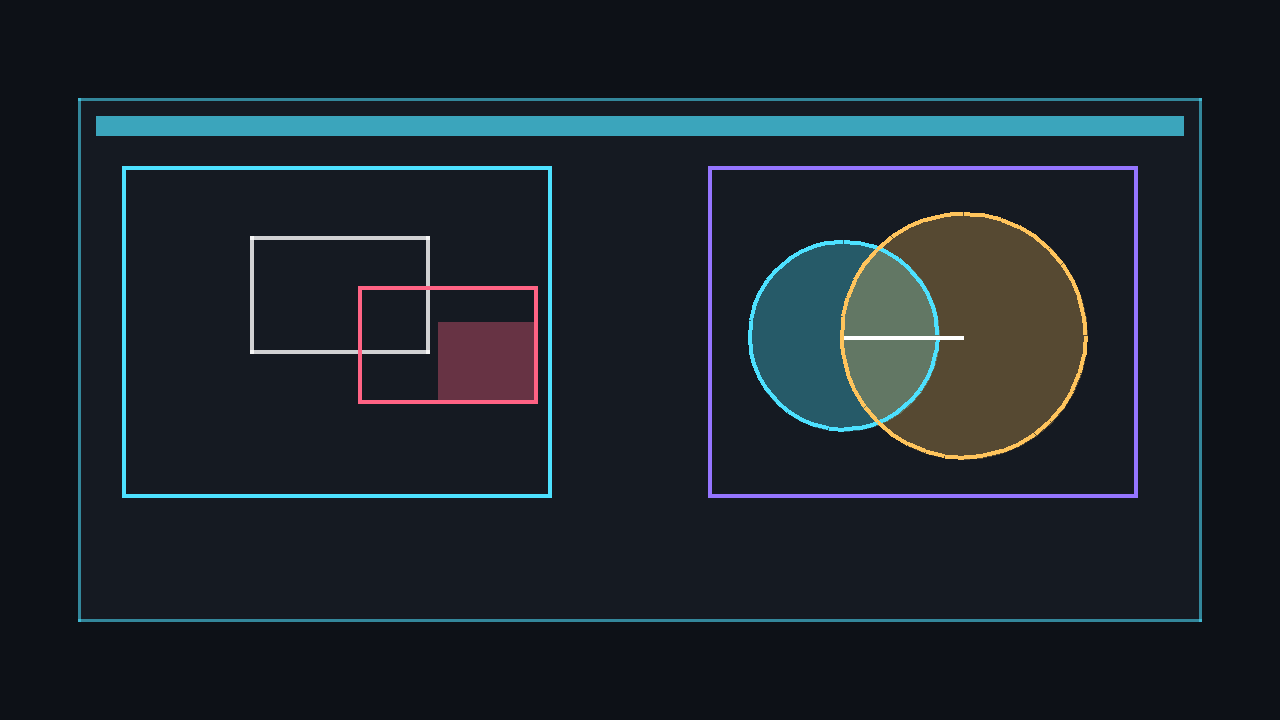
Rectangle playerBounds = new Rectangle(64, 64, 32, 48);
Rectangle wallBounds = new Rectangle(80, 80, 128, 32);

if (playerBounds.Intersects(wallBounds))
{
    // The rectangles overlap. Respond by stopping, bouncing, taking damage, and so on.
}
💡 AABB checks are deliberately approximate. If your sprite has transparent corners, its rectangle can collide before the visible pixels touch. That is normally a worthwhile trade-off for predictable gameplay.
Point-in-rectangle clicks
For clicking buttons, tiles, or objects, test whether the mouse position is inside a rectangle with Rectangle.Contains. MonoGame's MouseState.Position gives you a Point, which can be passed directly to Contains.
MouseState mouse = Mouse.GetState();
Rectangle buttonBounds = new Rectangle(24, 24, 180, 48);

if (buttonBounds.Contains(mouse.Position) &&
    mouse.LeftButton == ButtonState.Pressed)
{
    // The player clicked inside the button rectangle.
}
⚠️ Caution: A raw pressed check runs every frame while the button is held. Compare the current mouse state with the previous frame when you need a single click event.
Circle-circle collision
Circles are useful for balls, explosions, radial sensors, and forgiving character hit areas. Two circles overlap when the distance between their centres is less than or equal to the sum of their radii. Vector2.Distance is clear; Vector2.DistanceSquared avoids a square root and is faster when you only need a yes/no answer.
Vector2 centreA = new Vector2(120, 160);
Vector2 centreB = new Vector2(168, 160);
float radiusA = 24f;
float radiusB = 32f;

bool touchingWithDistance = Vector2.Distance(centreA, centreB) <= radiusA + radiusB;

float combinedRadius = radiusA + radiusB;
float distanceSquared = Vector2.DistanceSquared(centreA, centreB);
bool touchingFast = distanceSquared <= combinedRadius * combinedRadius;
💡 Use squared distance in tight loops with many objects. The result is identical for comparison, provided you square the combined radius too.
Resolving overlap and walls
Detection alone is not enough. Collision response moves objects to a valid position. For AABB movement, a beginner-friendly technique is to resolve one axis at a time: try the intended X movement, block it if it intersects a wall, then try the intended Y movement. This stops the player before entering a wall and naturally allows sliding along edges.
If two rectangles are already overlapping, separate along the smallest penetration axis. Push left or right if the horizontal overlap is smaller; push up or down if the vertical overlap is smaller.
Rectangle overlap = Rectangle.Intersect(playerBounds, wallBounds);

if (overlap.Width < overlap.Height)
{
    playerPosition.X += playerBounds.Center.X < wallBounds.Center.X
        ? -overlap.Width
        : overlap.Width;
}
else
{
    playerPosition.Y += playerBounds.Center.Y < wallBounds.Center.Y
        ? -overlap.Height
        : overlap.Height;
}
private Vector2 MoveWithWalls(Vector2 position, Vector2 velocity, float dt, List<Rectangle> walls)
{
Vector2 next = position;
next.X += velocity.X * dt;
Rectangle horizontalBounds = BoundsAt(next);
foreach (Rectangle wall in walls)
{
if (horizontalBounds.Intersects(wall))
{
next.X = position.X;
break;
}
}
next.Y += velocity.Y * dt;
Rectangle verticalBounds = BoundsAt(next);
foreach (Rectangle wall in walls)
{
if (verticalBounds.Intersects(wall))
{
next.Y = position.Y;
break;
}
}
return next;
}
private Rectangle BoundsAt(Vector2 position)
{
return new Rectangle((int)position.X, (int)position.Y, 32, 48);
}⚠️ Warning: Do not simply reverse velocity for a player walking into a wall. That feels like rubber. For controlled characters, clamp or cancel the blocked movement; reserve bouncing for balls, bullets, and arcade objects.
Fast objects and tunnelling
Tunnelling happens when a fast object moves from one side of a thin obstacle to the other between frames, so the final rectangle never overlaps the wall. The simple fix is to check the intended position before applying movement, as shown above. For very fast projectiles, split movement into smaller sub-steps and test each step.
const float MaxStepPixels = 8f;
Vector2 totalMove = velocity * dt;
int steps = Math.Max(1, (int)Math.Ceiling(totalMove.Length() / MaxStepPixels));
Vector2 stepMove = totalMove / steps;

for (int i = 0; i < steps; i++)
{
    Vector2 intended = position + stepMove;
    Rectangle intendedBounds = BoundsAt(intended);

    if (!intendedBounds.Intersects(wall))
        position = intended;
    else
        break;
}
⚠️ Caution: Sub-stepping is more expensive because it runs more collision checks. Use it only for objects that can genuinely cross an obstacle in a single frame.
Complete example: blocks and bouncing balls
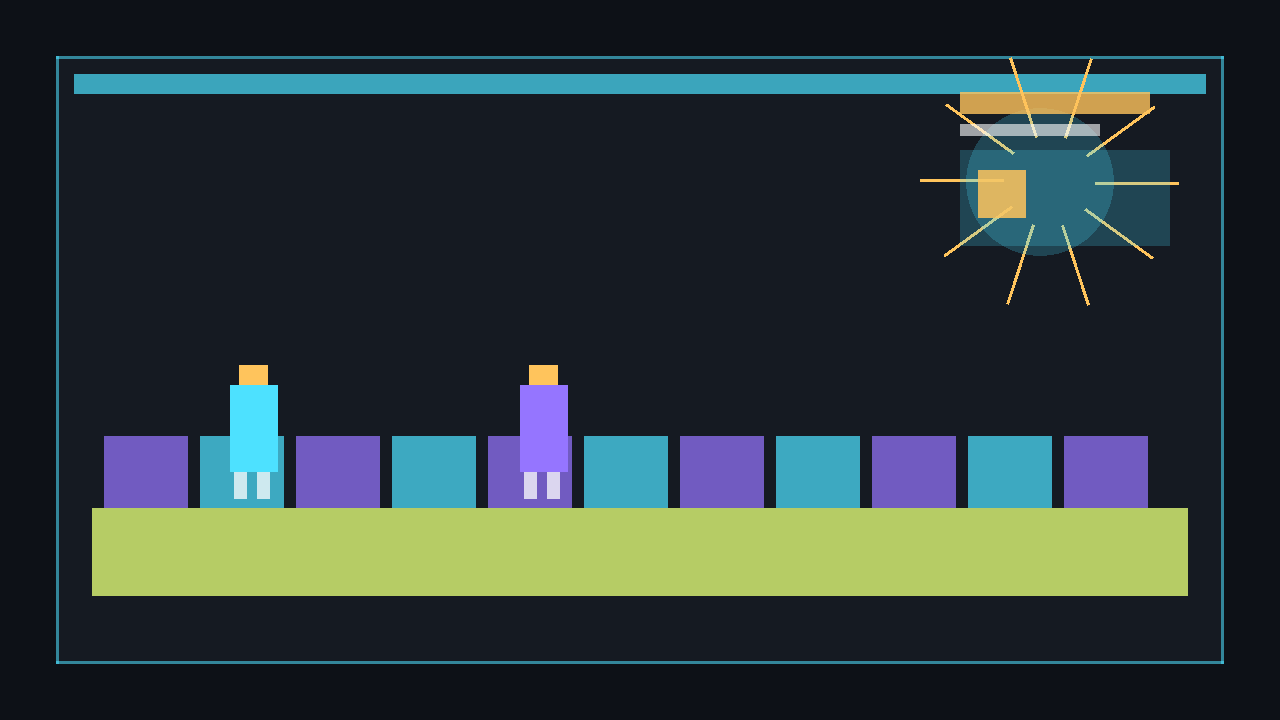
This complete Game1.cs creates a 1x1 pixel texture in code, draws a controllable player box, blocks movement through static rectangles, and bounces circular balls away from each other when their circles overlap. Use WASD to move and Escape to quit.
using System;
using System.Collections.Generic;
using Microsoft.Xna.Framework;
using Microsoft.Xna.Framework.Graphics;
using Microsoft.Xna.Framework.Input;

public class Game1 : Game
{
    private readonly GraphicsDeviceManager _graphics;
    private SpriteBatch _spriteBatch;
    private Texture2D _pixel;

    private Vector2 _playerPosition = new Vector2(48, 80);
    private const int PlayerWidth = 32;
    private const int PlayerHeight = 48;
    private const float PlayerSpeed = 220f;

    private readonly List<Rectangle> _blocks = new List<Rectangle>
    {
        new Rectangle(160, 80, 96, 32),
        new Rectangle(160, 112, 32, 128),
        new Rectangle(320, 180, 160, 32),
        new Rectangle(520, 80, 48, 220)
    };

    private readonly List<Ball> _balls = new List<Ball>
    {
        new Ball(new Vector2(300, 80), new Vector2(180, 140), 18f, Color.OrangeRed),
        new Ball(new Vector2(430, 95), new Vector2(-150, 120), 24f, Color.Gold),
        new Ball(new Vector2(620, 250), new Vector2(-170, -150), 20f, Color.MediumPurple)
    };

    public Game1()
    {
        _graphics = new GraphicsDeviceManager(this);
        Content.RootDirectory = "Content";
        IsMouseVisible = true;
    }

    protected override void Initialize()
    {
        _graphics.PreferredBackBufferWidth = 800;
        _graphics.PreferredBackBufferHeight = 480;
        _graphics.ApplyChanges();

        base.Initialize();
    }

    protected override void LoadContent()
    {
        _spriteBatch = new SpriteBatch(GraphicsDevice);
        _pixel = new Texture2D(GraphicsDevice, 1, 1);
        _pixel.SetData(new[] { Color.White });
    }

    protected override void Update(GameTime gameTime)
    {
        KeyboardState keyboard = Keyboard.GetState();
        if (keyboard.IsKeyDown(Keys.Escape))
            Exit();

        float dt = (float)gameTime.ElapsedGameTime.TotalSeconds;
        Vector2 input = Vector2.Zero;

        if (keyboard.IsKeyDown(Keys.A)) input.X -= 1f;
        if (keyboard.IsKeyDown(Keys.D)) input.X += 1f;
        if (keyboard.IsKeyDown(Keys.W)) input.Y -= 1f;
        if (keyboard.IsKeyDown(Keys.S)) input.Y += 1f;

        if (input != Vector2.Zero)
            input.Normalize();

        MovePlayer(input * PlayerSpeed, dt);
        UpdateBalls(dt);

        base.Update(gameTime);
    }

    private void MovePlayer(Vector2 velocity, float dt)
    {
        Vector2 next = _playerPosition;

        next.X += velocity.X * dt;
        Rectangle horizontalBounds = PlayerBoundsAt(next);
        foreach (Rectangle block in _blocks)
        {
            if (horizontalBounds.Intersects(block))
            {
                next.X = _playerPosition.X;
                break;
            }
        }

        next.Y += velocity.Y * dt;
        Rectangle verticalBounds = PlayerBoundsAt(next);
        foreach (Rectangle block in _blocks)
        {
            if (verticalBounds.Intersects(block))
            {
                next.Y = _playerPosition.Y;
                break;
            }
        }

        Rectangle screen = GraphicsDevice.Viewport.Bounds;
        next.X = MathHelper.Clamp(next.X, 0, screen.Width - PlayerWidth);
        next.Y = MathHelper.Clamp(next.Y, 0, screen.Height - PlayerHeight);
        _playerPosition = next;
    }

    private void UpdateBalls(float dt)
    {
        Rectangle screen = GraphicsDevice.Viewport.Bounds;

        foreach (Ball ball in _balls)
        {
            ball.Position += ball.Velocity * dt;

            if (ball.Position.X - ball.Radius < 0f)
            {
                ball.Position.X = ball.Radius;
                ball.Velocity.X *= -1f;
            }
            else if (ball.Position.X + ball.Radius > screen.Width)
            {
                ball.Position.X = screen.Width - ball.Radius;
                ball.Velocity.X *= -1f;
            }

            if (ball.Position.Y - ball.Radius < 0f)
            {
                ball.Position.Y = ball.Radius;
                ball.Velocity.Y *= -1f;
            }
            else if (ball.Position.Y + ball.Radius > screen.Height)
            {
                ball.Position.Y = screen.Height - ball.Radius;
                ball.Velocity.Y *= -1f;
            }
        }

        for (int i = 0; i < _balls.Count; i++)
        {
            for (int j = i + 1; j < _balls.Count; j++)
            {
                ResolveBallCollision(_balls[i], _balls[j]);
            }
        }
    }

    private static void ResolveBallCollision(Ball a, Ball b)
    {
        Vector2 difference = b.Position - a.Position;
        float combinedRadius = a.Radius + b.Radius;
        float distanceSquared = difference.LengthSquared();

        if (distanceSquared > combinedRadius * combinedRadius)
            return;

        float distance = (float)Math.Sqrt(distanceSquared);
        Vector2 normal = distance > 0f ? difference / distance : Vector2.UnitX;
        float overlap = combinedRadius - distance;

        a.Position -= normal * (overlap * 0.5f);
        b.Position += normal * (overlap * 0.5f);

        Vector2 aVelocity = a.Velocity;
        a.Velocity = Vector2.Reflect(a.Velocity, normal);
        b.Velocity = Vector2.Reflect(b.Velocity, -normal);

        if (Vector2.Dot(a.Velocity, normal) > Vector2.Dot(aVelocity, normal))
        {
            a.Velocity *= 0.98f;
            b.Velocity *= 0.98f;
        }
    }

    private Rectangle PlayerBoundsAt(Vector2 position)
    {
        return new Rectangle((int)position.X, (int)position.Y, PlayerWidth, PlayerHeight);
    }

    protected override void Draw(GameTime gameTime)
    {
        GraphicsDevice.Clear(Color.CornflowerBlue);

        _spriteBatch.Begin();

        foreach (Rectangle block in _blocks)
            _spriteBatch.Draw(_pixel, block, Color.DimGray);

        _spriteBatch.Draw(_pixel, PlayerBoundsAt(_playerPosition), Color.DeepSkyBlue);

        foreach (Ball ball in _balls)
        {
            Rectangle bounds = new Rectangle(
                (int)(ball.Position.X - ball.Radius),
                (int)(ball.Position.Y - ball.Radius),
                (int)(ball.Radius * 2f),
                (int)(ball.Radius * 2f));

            _spriteBatch.Draw(_pixel, bounds, ball.Colour);
        }

        _spriteBatch.End();

        base.Draw(gameTime);
    }

    private sealed class Ball
    {
        public Vector2 Position;
        public Vector2 Velocity;
        public float Radius;
        public Color Colour;

        public Ball(Vector2 position, Vector2 velocity, float radius, Color colour)
        {
            Position = position;
            Velocity = velocity;
            Radius = radius;
            Colour = colour;
        }
    }
}
Run it with dotnet run. Because every texture is generated from a single white pixel, the sample needs no content pipeline assets.
dotnet build
dotnet run
Tilemaps and performance
For tile-based games, each solid tile can become a rectangle and use the same Rectangle.Intersects logic. See Creating a Tilemap for building and drawing grid-based worlds.
When you have many moving objects, avoid checking every object against every other object. Put objects into a spatial partitioning grid, then only test collisions inside the current cell and neighbouring cells. This keeps collision work close to local instead of growing rapidly with the total object count.
int cellSize = 64;
Point cell = new Point(
    (int)(position.X / cellSize),
    (int)(position.Y / cellSize));

// Store each object in a dictionary keyed by cell coordinates, then test only
// nearby cells instead of comparing every object with every other object.
⚠️ Warning: Start simple. A handful of rectangles can be checked directly; add a tile query or spatial grid when profiling shows collision checks are becoming expensive.
Next steps
🎓 Test Your Knowledge
Check your understanding of the key concepts from this tutorial.
What does Rectangle.Intersects() return?
✔ Correct!
✘ Not quite.
if (rectA.Intersects(rectB)) { /* handle collision */ }
What is an AABB in collision detection?
✔ Correct!
✘ Not quite.
AABB collision is cheap: just compare min/max extents on X and Y axes.
Why are circular collision checks sometimes better than rectangular ones?
✔ Correct!
✘ Not quite.
float dist = Vector2.Distance(a.Center, b.Center); if (dist < a.Radius + b.Radius) { /* collision */ }
What is “spatial partitioning” in the context of collision detection?
✔ Correct!
✘ Not quite.
Without spatial partitioning, every object must be tested against every other: O(n²). A grid reduces this dramatically.